Nisus Writer Updates

We are happy to announce the release and immediate availability of Nisus Writer Pro 3.2.2 and Nisus Writer Express 4.2.2.

These updates have plenty of fixes and enhancements for your writing pleasure, including preliminary macOS Monterey compatibility (pending Apple’s final release) and Bookends 14 compatibility. You can read the voluminous changes in our Nisus Writer Pro release notes or Nisus Writer Express release notes.

These updates are free for existing owners of the current version of each app. You get the update from inside the apps, the Mac App Store, or our website.
Issues with macOS Monterey and Bookends 14

Nisus Writer has issues with two recently released pieces of software:

1. The latest beta/preview version of macOS Monterey. Nisus Writer will often crash due to changes in the macOS system.

2. The recently released Bookends version 14. Nisus Writer can’t communicate directly with this version of Bookends due to internal changes in how the app identifies itself.

We are working on a software update to Nisus Writer that addresses all of these issues. We hope to finalize and release those updates soon. However, if you need to bypass these problems immediately please contact us about obtaining early access to a private beta version of Nisus Writer.

UPDATE: These issues have been resolved in Nisus Writer Pro version 3.2.2 and Nisus Writer Express 4.2.2.

File Conversion Failures due to Permissions

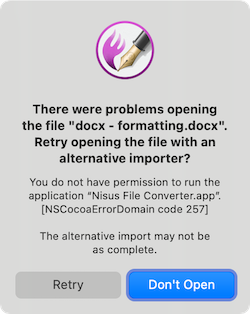
We’ve recently had more reports that Nisus Writer Pro users can’t import or export file formats that require conversion (e.g. DOCX). The error message states that “you do not have permission” to run the Nisus File Converter app. The alert looks like this:

This is caused by a bug that was introduced in recent versions of macOS Catalina and Big Sur. It affects not only Nisus Writer’s file converter, but also other kinds of helper apps. Apple has a support page for affected scanner software. MacRumors reports that apparently Apple will fix the problem in a future system update.

To quickly bypass the issue you can click the “Retry” button in Nisus Writer Pro. That will use a backup converter built into macOS. However, be aware that this backup conversion is less thorough and will omit special content like styles, comments, footnotes, etc.

You can fully bypass the issue by first manually launching the Nisus File Converter app in the Finder. Please see our FAQ for a precise list of workaround steps and more details on this issue.