SummerFest 2020

Spring is gone, and I don’t think many of us will miss it. It’s now summer, a time of warm weather, lounging around (socially distanced of course), and SummerFest savings!

SummerFest is a collection of independent software developers who are creating great tools for organizing, writing, and delivering your thoughts and ideas. These are tools created with care, and refined by experience. This is high quality software, on sale now for a limited time.

As part of SummerFest, you can save 25% on InfoClick and the newly updated Nisus Writer Express and Nisus Writer Pro by using the coupon SUMMERFEST2020 at checkout in our store. You can also save at least 25% on the other apps in this year’s SummerFest by using the same coupon. There is a great collection of software this year, and the official SummerFest page has all the details.

Nisus Writer Pro 3.1

We are happy to announce the release and immediate availability of Nisus Writer Pro 3.1.

Nisus Writer Pro 3.1 is a significant update that:

  • restores non-English localizations (Danish, French, German, Italian, Polish and Portuguese),
  • improves compatibility with macOS 10.15 Catalina,
  • adds several enhancements, and
  • fixes many important bugs.

The complete list of fixes can be found on our Nisus Writer Pro release notes page

Nisus Writer Pro 3.1 is available now and is a free update to all users of Nisus Writer Pro 3. You can update from within the app using the menu Nisus Writer Pro > Check for Updates, or download from our Nisus Writer Pro update page. Mac App Store users can download the update directly from the Mac App Store app. 

For those who have not purchased the upgrade to Nisus Writer Pro 3, you can do so from our store for only $45. Users of Nisus Writer Pro versions 1 and 2 are eligible for upgrade pricing. A full version is available for $65, or $55 for academic users. 

Upgrade pricing is not supported on the Mac App Store. If you would like to upgrade a previous Mac App Store purchase you can do so using these instructions

Nisus Writer Pro 3.1 requires macOS 10.11 or later.

App Store reviews and an odd request

Submitting your app to Apple for sale on the Mac App Store is always a roll of the dice. You never know if your app will sail through the App Store review process in a matter of hours, or if you’ll be dealt a setback that takes you days to resolve.

These days App Store review delays and outcomes are pretty good. There’s still the occasional significant setback, if Apple decides to disallow the use of certain system resources that were previously permitted. Finding replacement solutions and rewriting your code can be non-trivial. But mostly there are minor changes to make, if any.

During a recent App Store review, we were given a strange request: please submit a video of your app using the Touch Bar. In all the years we’ve been releasing on the App Store we’ve never been asked for any kind of video before.

We do indeed support the Touch Bar in Nisus Writer, but its basic usage is obvious; you press buttons to take built-in actions like creating a new document tab. Some of our available Touch Bar items are actually straight from Apple and macOS, like the ability to fix spelling mistakes in your text. It didn’t make any sense that Apple would need a video to confirm this. They could simply test the Touch Bar during review like any other feature.

The only aspect of Touch Bar support in Nisus Writer Pro that’s more involved is a unique feature that lets you create custom Touch Bar items. You can turn any menu into a new Touch Bar icon.
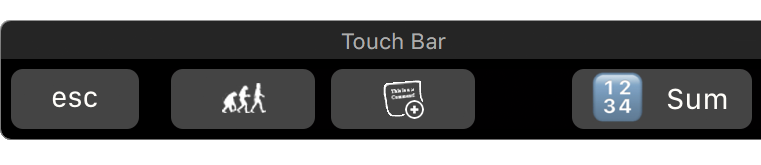
This is nice if you have certain commands that you want to access frequently.

Whatever the reason for Apple’s unexpected request, there was no getting around it. You can’t release an app on the App Store without approval. We were going to have to make this video.

I don’t currently have access to a MacBook with a Touch Bar, now that I’m working from home full time because of COVID-19. Luckily there are other ways to interact with the Touch Bar, like the simulator in Apple’s developer tools, or the Touché utility app that allows anyone to use the Touch Bar on any Mac.

Ultimately it didn’t take long to produce the video and pass review, but it was strange. Jumping through Apple’s hoops and satisfying their fancies is just something you have to accept if you’re developing apps for their devices.

Nisus License Lookup Tool

There are times, for whatever reason, that you need to find the license for your Nisus app. For example, you would like to upgrade to the latest version of Nisus Writer Express or Nisus Writer Pro. Perhaps you’re moving to a new computer and you need to install a fresh copy of InfoClick. How do you find your license?

Our Nisus License Lookup Tool, located on our main support page, will allow you to find your license and have it emailed to you. You just need the email address you used when you purchased your Nisus application and you will receive an email containing your license.