Intel Anti-Mac Ads Are Odd

Over the last week or so there has been quite a bit of talk about this new series of Intel ads. If you haven’t seen them, they feature Justin Long, the actor who was in the famous “I’m a Mac, I’m a PC” commercials, pointing out the differences between the M1 Macs and PCs using Intel chips in the new commercials.

The ads bash the M1 chips found in the MacBook Air and Pro. No surprise, as most benchmarks and real world performance show the M1 chipset is faster and more power efficient than most Intel chips. While the ads are effective at pointing out there is more choice on the PC side, they fail to show anything that is exclusive to Intel chips. The things they highlight can be done with AMD chips too. Oh, and there is a gratuitous “walled garden” mention on the Intel GoPC page

My question is who is the intended target of these ads? The general public? I doubt it. If they wanted to reach the computer buying public they would give Microsoft ad money to produce these commercials. Also, why isn’t Microsoft running these ads? This is something Microsoft should be doing, not Intel. 

If I had to guess who they were for, I would say Intel employees. Those employees have spent years hearing how they have repeatedly failed while Apple, the company the new Intel CEO referred to as “… a lifestyle company”, has become an innovator in the consumer chip sector. 

If that is true, I get what they were going for with these ads, but I also think they are misguided and desperate. If it isn’t true, then Intel needs to put their heads down and get to work. The performance and power management gap is going to get wider, and no attack ads are going to change that narrative. 
Garamond Font Discouraged by U.S. Court

We all know the importance of using an appropriate typeface. This week courts in Washington, D.C. have officially placed Garamond on the naughty list:

the court has determined that certain typefaces, such as Century and Times New Roman, are more legible than others, particularly Garamond, which appears smaller than the other two typefaces

This is absolutely true. Garamond has a distinct aesthetic that can be nice to look at, but it is smaller and always felt a bit cramped to me with its tight kerning.

A very old version of the Nisus website actually briefly used Garamond for certain text elements. That was over 20 years ago! But it was probably always a poor font choice for a webpage.

Big Sur and Sandbox Folder Names

Apple made some changes to the file system for macOS Big Sur. The big underlying change is the new cryptographically signed system volume that prevents tampering with system data (for better and worse). There is also another little change to what you see in the Finder when you browse sandbox folders.

As you may know, every app that adopts macOS sandboxing is given its own sandbox folder. This folder holds all local information for the app, like your app preferences. If you don’t ever give a sandboxed app access to additional files or folders (eg: by choosing extra locations in file handling dialogs), then you can be sure that everything the app stores on your Mac is kept in its sandbox. It’s a great idea. Not only does it increase security, but it also makes apps easier to uninstall: just delete the app and its sandbox.

Each sandbox folder’s name corresponds to the app’s internal identifier. For example: Nisus Writer Pro’s sandbox folder name is com.nisus.NisusWriter. That’s perhaps a little obscure, but it ensures sandbox folder names are unique. All sandbox folders are stored in a single location on your Mac, inside your home folder at:

~/Library/Containers

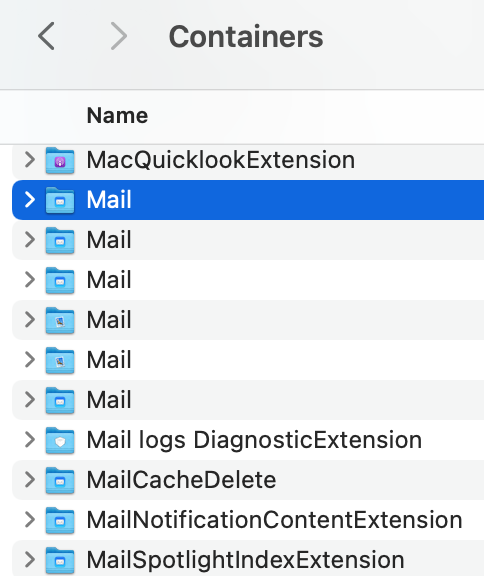
Big Sur changes how container names inside that folder are displayed in the Finder. Instead of showing identifiers you’ll see actual app names. That is generally an improvement, but it does also create some confusion.

The above Big Sur folder listing shows the problem: apps with related services may have several sandbox folders, which now all display using the same name. There’s one for Mail’s Spotlight importer, another for Mail’s sharing extension, and so on. But there’s no way to know which folder is the primary sandbox for Apple Mail.

This impacts InfoClick, our email search app, because it’s no longer obvious which Mail sandbox folder stores your emails. The Finder and standard file dialogs on Big Sur simply won’t show you the real folder names. Luckily there is still a way to choose the proper folder using the Go To Folder command. You can still paste the folder’s path to ensure you select the proper folder.

Apple Wants Their DTK Back

According to several reports it appears that Apple would really, really like developers to send back the DTK (Developer Transition Kit) Mac mini.

Thanks again for participating in the Universal Quick Start Program and committing to building great apps for Mac. We’re following up with shipping instructions to return the Developer Transition Kit (DTK) that was loaned to you as part of the program. Please take a moment to review these details and ship all DTKs back to us by March 31, 2021.

As we mentioned in our last email, upon confirmed return of the DTK, you’ll receive a credit for 500USD in the form of a one-time use promo code valid until the end of 2021. You can use it toward the purchase of a new ‌M1‌ Mac or other Apple products ordered through the Apple Store Online.

From what I have heard from developers who have access to the DTK, most are very happy to send them back. It appears the DTK minis are at best alpha level hardware. There are reports of many hardware and software issues. Also a bit slow compared to their M1 cousins (the DTK runs an A12Z chipset found in the current iPad Pro). Yet I know that a few of these will pop up on eBay as collectables with ridiculous pricing attached. Someone is going to buy one of these (looking at you, Stephen Hackett!) and I can’t understand it. On the other hand, Nisus still has a Power Mac G4 Cube in near perfect working order, so there is that.

I say send it back, get your 500USD credit and get a new M1 Mac and hope they fix this issue.