A Few Words About Catalina

A few weeks ago Catalina, or macOS 10.15 was released. Since then, it seems like mayhem has followed. Catalina breaks from the past in significant ways. Speaking of breaking, it also breaks some apps. Security has been tightened. There is quite a bit going on here that users should know. Since this is on a Nisus blog, we’ll start with Nisus apps.

Nisus Writer and Catalina

Nisus Writer Express 4 and Nisus Writer Pro 3.0.3 and above are compatible with Catalina. All previous versions of Nisus Writer are not compatible with Catalina and will not be updated. If you are planning on upgrading your Mac to Catalina, you will need to update and purchase a new license.

Catalina and Other Applications

Another issue is that we are now living in a 64 bit world and much like bell bottoms, 32 bit applications are out of fashion. To be fair, Apple has been warning users for years that 32 bit apps weren’t long for this world. Now it is a reality and these older apps either need to be updated or you need to find others apps that work similarly. I can say that all of our apps are 64 bit and have been for quite a while. If you need help with this, there is a great utility called Go64 from St. Clair Software that scans your app folder to find these 32 bit applications.

If you are an Adobe user you may want to read this first and take the appropriate steps.

In any event, you may want to check with developers of apps you rely on and make sure they will work with Catalina before you upgrade. It will save you quite a bit of work.

Security

Lastly, there is a big focus on security in Catalina. It’s a different world now and the security changes are welcome. Here is an article that explains some of the new security features. Basically, Catalina is more secure by default. However, these new features are either helpful or annoying, depending on your point of view.

Look Before You Leap

These a just a few of the changes. You should also keep in mind that point zero releases of a new operating system can be buggy. Recently there was a supplemental update to Catalina that fixed a few issues. Since then there was a new release of the supplemental update. I’m not giving advice here, but I normally wait a release or two before I upgrade. By then most of the major bugs have been fixed. Let’s hope that is the case with Catalina.

All of this prose is to say that with Catalina you need to look before you leap. Make sure you know what you’re getting into before you upgrade. There are plenty of great Catalina reviews out there. Read a few and then decide.
Tips and Tricks: How To Change the Default Window Size and Position

A question that comes up in support quite a bit is how do you change the default window size?

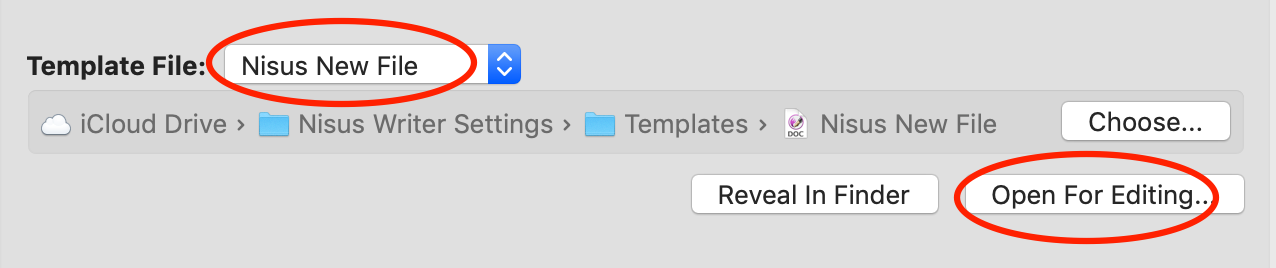
First, a bit of an explanation. Whenever you create a new document in Nisus Writer a template file is loaded. The settings in the template file are used for the new document. This template is called the “Nisus New File”. To control the default window dimensions and placement you’ll want to edit the Nisus New File template so the window appears how you’d like.

  1. Open your Nisus Writer preferences.
  2. Switch to the “New File” pane.
  3. Click the “Advanced” tab.
  4. Under “Template File” where you see “Nisus New File”, click the button “Open For Editing”:
  5. The new file template will open as a normal Nisus Writer document.
  6. Make any desired changes, eg: resize and reposition the window on screen.
  7. Save the changes to disk, eg: using the menu File > Save.
  8. Close the template document.

Once you’ve edited the template all new files will load your updated settings from that template. This includes not only the window size and placement, but all other settings like styles, default view, etc.

We hope this tip is helpful. If you have a tip of your own to share, or any suggestions or comments, please let us know. We’d love to hear from you!

Nisus Writer Express 4

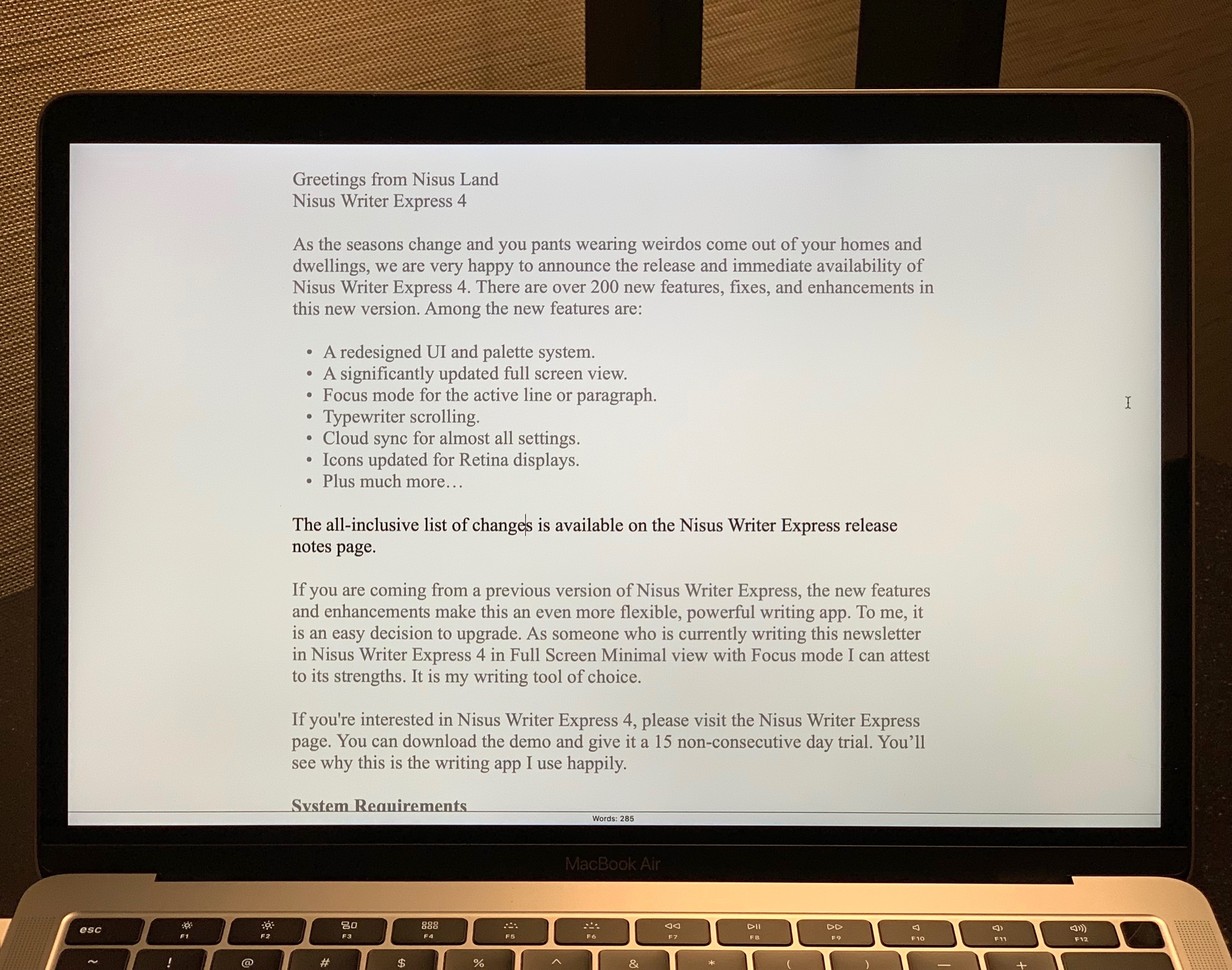
We are very happy to announce the release and immediate availability of Nisus Writer Express 4. There are over 200 new features, fixes, and enhancements in this new version. Among the new features are:

  • A redesigned UI and palette system.
  • A significantly updated full screen view.
  • Focus mode for the active line or paragraph.
  • Typewriter scrolling.
  • Cloud sync for almost all settings.
  • Icons updated for Retina displays.
  • Plus much more…

There is a long list of all the changes available on the Nisus Writer Express release notes page.

If you are coming from a previous version of Nisus Writer Express, the new features and enhancements make this an even more flexible, powerful writing app.

Nisus Writer Express 4 is $26 USD. For those upgrading from any previous version of Express, the cost is $20. If you are upgrading, you will need your previous Express license. This can be found by using our license lookup tool, which is located on our main support page.

On a personal note, Express is my writing tool of choice. I’ve been using it for years. As someone who wrote quite a bit recently in Nisus Writer Express 4 in Full Screen Minimal view with Focus mode I can attest to its strengths. It is my writing tool of choice.

If you would like to learn more about Nisus Writer Express 4, please visit the Nisus Writer Express product page. You can download the demo and give it a 15 non-consecutive day trial. You’ll see why this is the writing app I use happily.